ChatGPT Business Hub: how to claim your profile and read the numbers
ChatGPT Business Hub only counts a mention when ChatGPT references your website. Here is how to claim your profile and what the numbers leave out.

Managing Director at Alexandrya.AI
ChatGPT Business Hub is the dashboard where businesses have been able to claim their ChatGPT profile since 10 November 2026. Once verified, you can edit your website, description, category, logo and product feed, and you see three metrics for the past 28 days: mentions, website clicks and discovery topics. A mention only counts when ChatGPT references your website. Your brand name on its own does not count.
Our advice is to claim your profile this week, even though the beta shows very little. It will not carry your content or citation decisions, because it covers no prompts, no competitors and no other AI platforms. Our own daily scan on 17 November 2026 shows how wide that gap can be. ChatGPT named Alexandrya.AI in none of 43 answers, while Google AI Mode, Google AI Overviews, Gemini and Perplexity named it in ten between them.
What is ChatGPT Business Hub?
ChatGPT Business Hub is part of Businesses in ChatGPT, a beta that OpenAI launched on 10 November 2026. Businesses use it to claim their profile, keep details and product feeds up to date, and see aggregated metrics on how ChatGPT uses them in answers. OpenAI says 1.2 billion people use ChatGPT every week. Business Agents, which are branded chat agents, launched only for eligible ecommerce and online service businesses in the US.
OpenAI describes the launch in Introducing Businesses in ChatGPT (accessed 17 November 2026). The hub has four parts, and not every business can use all of them:
| Part | What it does | Who can use it |
|---|---|---|
| Business profile | Edit website, description, category, logo, cover photo, delivery and return policies | any eligible business in a region where ChatGPT is available |
| Product feed | Share prices and availability via a CSV file, a hosted URL or Shopify | businesses that sell products |
| Insights | Mentions, website clicks and discovery topics for the past 28 days | after identity verification is approved |
| Business Agent | Answers questions about products and policies in a separate, labelled chat | eligible ecommerce and online service businesses in the US |
For a B2B company in Europe, that leaves two of the four parts today: the profile and the insights. The agent and the product feed are built for retailers.
Business Hub has nothing to do with ChatGPT Business, the paid plan that was called ChatGPT Team until August 2025. According to OpenAI, you need neither an Ads account nor a ChatGPT Enterprise agreement to claim a business.
Can businesses outside the US use Business Hub?
Businesses outside the US can claim their ChatGPT Business Hub profile, provided the required verification is supported for their business. OpenAI opens profiles to any eligible business based in a region where ChatGPT is available, with two limits. Local stores and restaurants can currently claim only an existing US listing. Business Agents remain limited to US ecommerce and online service businesses for now.
You only find out whether your business qualifies inside the hub. If the search finds no listing, ChatGPT may offer eligible online businesses the option to add one. If you see “Contact support”, the listing is locked and you need OpenAI Support to get access.
How to claim your business on ChatGPT
Setup involves two checks. First you confirm your link to the business, then you verify your identity with Persona, an identity verification service. The steps follow OpenAI’s help article Setting up your business on ChatGPT (accessed 17 November 2026):
- Sign in to ChatGPT, open Business Hub from the sidebar and search for your business by name.
- Select the matching listing and confirm the ChatGPT account you will manage it with. Choose that account carefully, because later invitations can depend on it.
- Confirm your link to the business by text message or call to the business phone number, by a code sent to the business email, by adding a TXT record to your domain’s DNS, or through your Shopify store.
- Wait for approval. OpenAI reviews the claim and replies by email.
- Complete identity verification with Persona. You may need a government-issued ID, business registration details and proof that you are authorised to represent the business. The blue verified badge appears only after this step is approved.
- Fill in the profile: website, description, category, logo, delivery and return policies, plus a cover photo and product feed if you want them.
- Invite teammates and your agency, each with their own ChatGPT account.
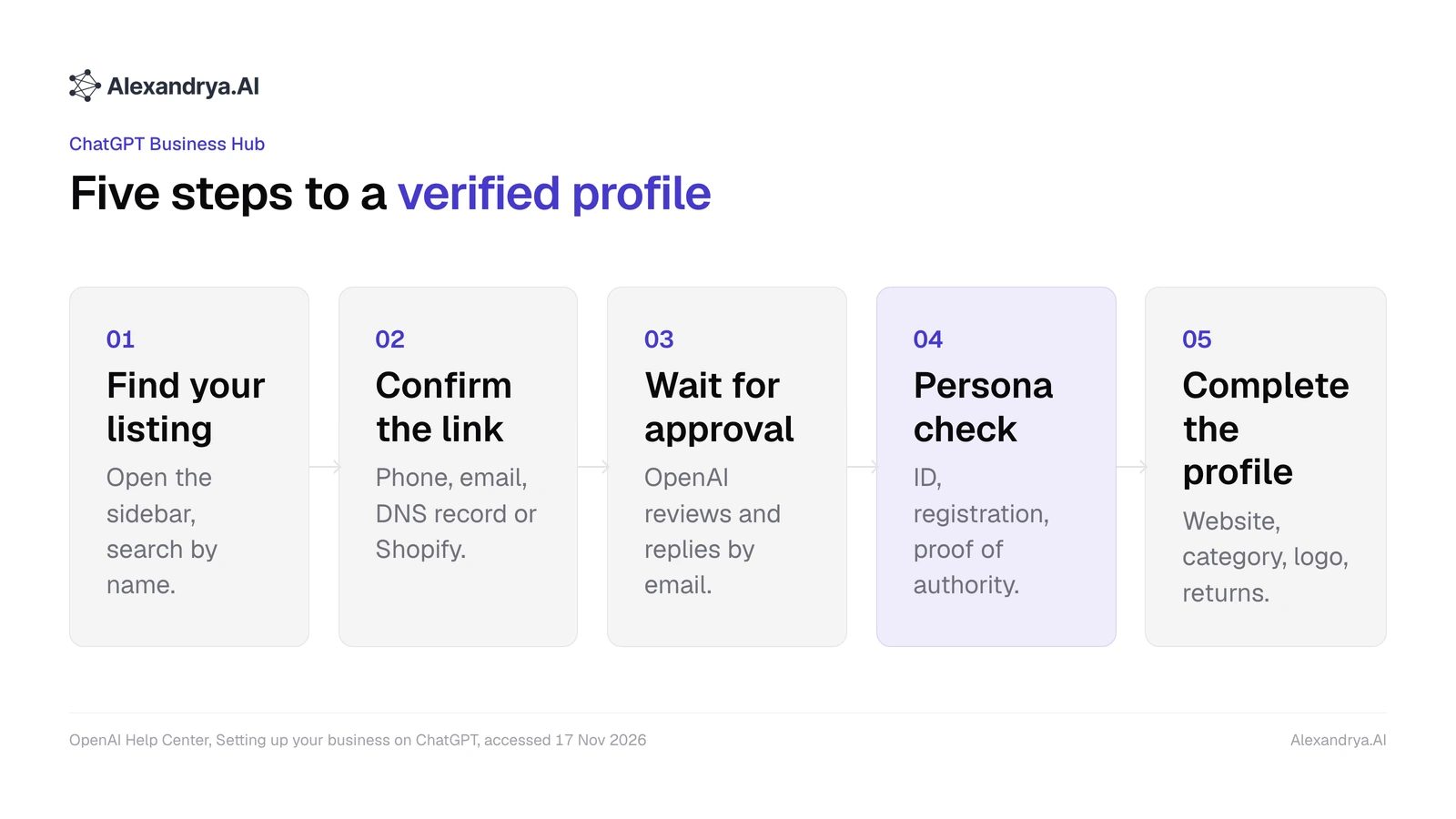
Setting up ChatGPT Business Hub in five steps, based on OpenAI’s help article, accessed 17 November 2026.
In practice, four points tend to slow setup down:
- Persona needs someone with authority to represent the business. An agency cannot complete the check alone, although the admin can invite it afterwards.
- A new profile created through Persona goes live as soon as OpenAI approves it, and OpenAI Support cannot delete or hide a published profile. Check your details before you submit.
- Each brand is managed separately. OpenAI does not yet offer central management across a parent company’s brands and locations, and claiming the main brand does not claim its locations.
- OpenAI reviews edits before publishing them, and ChatGPT keeps drawing on other sources too.
The Persona check means handing ID and company records to a third-party provider, so involve your data protection officer first. If someone else has already claimed your business, open the profile menu, choose to dispute ownership and verify through Persona that you are authorised.
What counts as a mention in Business Hub?
ChatGPT Business Hub counts a mention for an online business only when ChatGPT references the business’s website, in other words uses it as a source. If ChatGPT names your brand in its answer without referencing your website, the hub does not record it. For a local business, any result shown for that location counts, even if nobody opens the listing. The same word therefore describes two different events.
Website clicks, discovery topics and blank fields have quirks of their own that matter when you report:
| Metric | OpenAI’s definition | What it means for your reporting |
|---|---|---|
| Mentions, online business | ChatGPT references the website; the brand name alone does not count | closer to a citation than a brand mention |
| Mentions, local business | ChatGPT shows a result for the location | includes impressions without a click |
| Website clicks | how often people click through from ChatGPT to your website | check against your web analytics before you report them |
| Discovery topics | common themes in answers that mentioned or cited you | no individual prompts and no direct measure of buying intent |
| Blank field | below the reporting threshold, data still being collected or reporting unavailable | does not mean zero activity |
The hub aggregates all of these over the past 28 days. OpenAI does not share individual conversations or chats with a Business Agent.
Our own tracking shows how far brand mentions and website references drift apart. Alexandrya.AI sends the same prompts to ChatGPT every day and counts the mention in the answer text and the link to the domain separately. Between 28 September and 27 October 2026, our own brand appeared on six days across 1,119 ChatGPT answers. On 7 October, ChatGPT named Alexandrya.AI without linking to alexandrya.ai. On 8 and 16 October it linked to the domain without naming the brand. From 25 to 27 October both happened together. Under Business Hub’s definition, 7 October would have been a day with no mention, while 8 and 16 October would each have counted as a day with one.
Business Hub mentions therefore measure how often ChatGPT uses your pages as a source. They cannot tell you whether ChatGPT recommends you in the answer itself. For that you need mentions and citations as separate numbers. Our guide to choosing a ChatGPT tracking tool explains what a tool has to do for that.
Where Business Hub stays blind
ChatGPT Business Hub shows no individual prompts, no competitors and no other AI platforms. OpenAI’s help article lists only mentions, website clicks and discovery topics as insights, aggregated over 28 days. That leaves open which questions you are missing from, who gets named instead of you, which third-party pages ChatGPT cites for those answers, and how Gemini, Perplexity or Copilot describe you.
For content and citation decisions, the hub is missing five things:
- Discovery topics group themes. They tell you where you appear, but not which specific questions you are absent from.
- There are no competitor figures. Whether 300 mentions is a lot depends on how often ChatGPT references your competitors, which only an AI share of voice measurement shows.
- The comparison articles, forums and directories ChatGPT cites instead of your website stay hidden, and those are exactly the pages citation work targets.
- How ChatGPT describes you, its tone and the strengths or weaknesses it attributes to you, appears nowhere in the hub.
- The hub covers ChatGPT only. According to Similarweb, ChatGPT’s share of visits to generative AI websites fell from about 76% in June 2025 to roughly 53% by May 2026, while Gemini rose from under 9% to around 27 to 28% (published 29 July 2026).
The ChatGPT-only limit shows up in Alexandrya.AI’s own data too. In our daily scan on 17 November 2026, ChatGPT named our brand in none of 43 answers. Google AI Mode named it in 4 answers, Google AI Overviews in 3, Gemini in 2, Perplexity in 1 and Microsoft Copilot in none. Those ten answers sit outside anything Business Hub can capture. Our explainer What is AI visibility? covers why visibility spans more than one platform.
Does claiming your profile improve visibility in ChatGPT?
Claiming your ChatGPT Business Hub profile does not directly increase your visibility in ChatGPT. OpenAI states that neither claiming a profile nor disputing ownership changes its visibility, and that connecting a product feed does not guarantee ChatGPT will recommend your products. Advertising does not influence ChatGPT’s independent answers either, according to OpenAI. What changes is the information ChatGPT can draw on.
Paid visibility in ChatGPT runs through a separate route. OpenAI says businesses can promote their Business Agent for a fee and use it as a destination for ChatGPT Ads. Sponsored placements are labelled and kept apart from ChatGPT’s answers.
Claiming still pays off, and early. You control the facts ChatGPT has about your website, category, delivery and returns, and you get the blue badge once Persona approves you. You stop a third party from claiming the listing first and forcing you into an ownership dispute. You also start a first-party data series, because no external tool can see your website clicks from ChatGPT.
Note your mentions and clicks on day one and compare after 28 days, the window the hub aggregates over.
Using Business Hub alongside Alexandrya.AI
Alexandrya.AI is an AI visibility tool from Munich that measures brand mentions in ChatGPT, Gemini, Perplexity and Bing Copilot and turns them into content and citation tasks. Business Hub, by contrast, reports data from real ChatGPT conversations: how often ChatGPT uses your website as a source and how often someone clicks through. The two tools answer different questions and overlap in only one place.
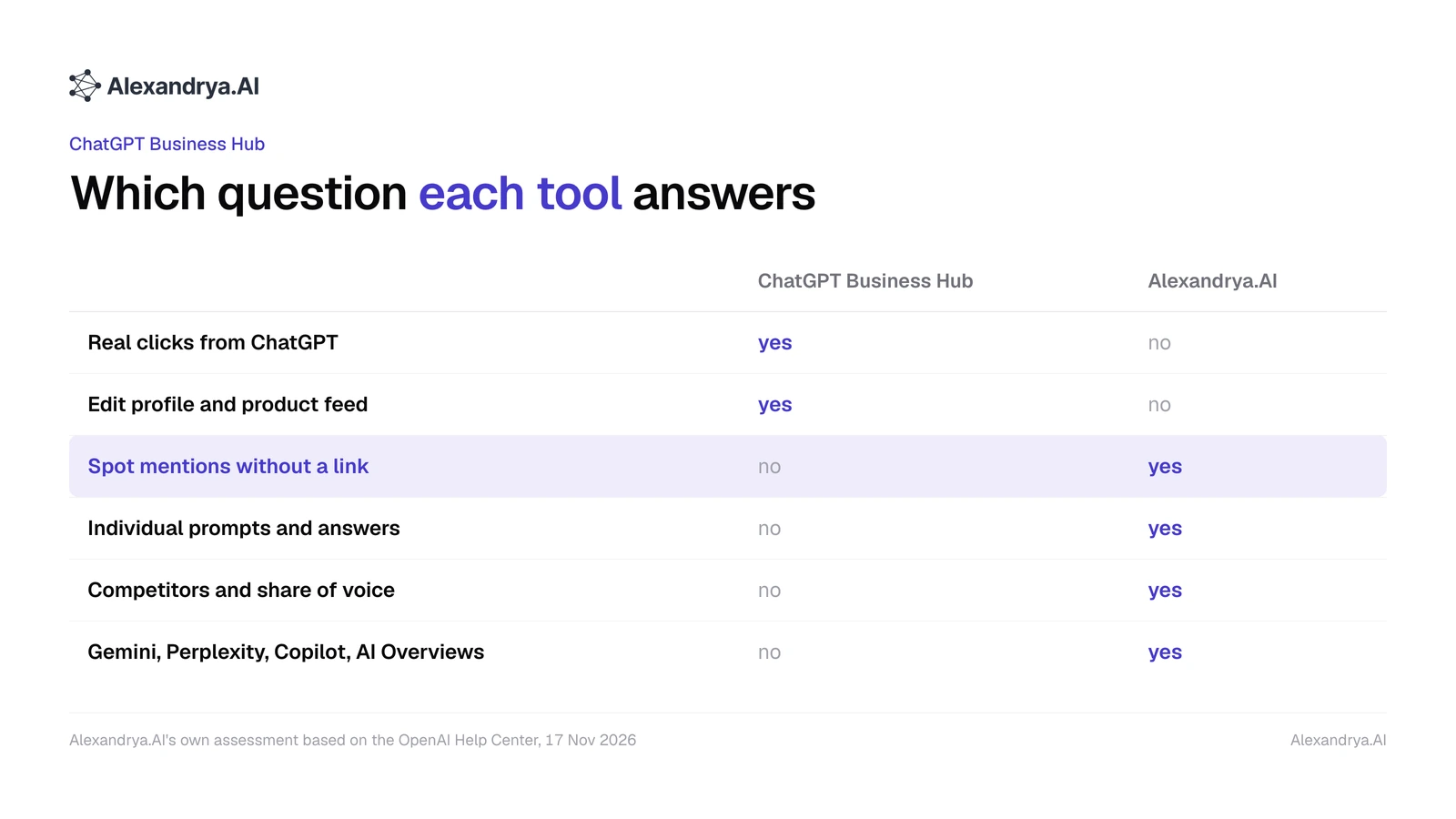
Which question each tool answers. Alexandrya.AI’s own assessment based on OpenAI’s help article, as of 17 November 2026.
| Question | ChatGPT Business Hub | Alexandrya.AI |
|---|---|---|
| How often does ChatGPT use my website as a source? | mentions from real conversations, 28 days | citations per prompt and platform, daily |
| How often do people click through from ChatGPT? | website clicks | not measurable |
| Does ChatGPT name my brand without a link? | not recorded | mentions and citations counted separately |
| Which questions am I missing from? | themes only, no prompts | per prompt, with the full answer text |
| Who gets named instead of me? | not recorded | competitors and share of voice |
| Which pages does the AI cite instead of mine? | not recorded | sources and domains by source type and position |
| What about Gemini, Perplexity, Copilot and Google AI Overviews? | not recorded | in the same dashboard |
| What should I do next? | no recommendations | recommendations as tasks: content briefs, pitch list, quick wins |
| Where is the data held? | with OpenAI | hosted in Germany, GDPR-compliant, DPA on request |
Business Hub and Alexandrya.AI only measure the same event on the first question, once from real conversations and once from a fixed prompt set. That overlap is where combining them helps. In practice we connect the two like this:
- Match the discovery topics in the hub against your prompt list in Alexandrya.AI. If a topic appears in the hub that none of your prompts covers, add two or three prompts for it.
- Put the hub’s mentions next to the ChatGPT link score in Alexandrya.AI as a calibration point. If both move in the same direction across several 28-day windows, your prompt list is doing its job. If they keep diverging, you are missing prompts on topics where ChatGPT really does use your website.
- Work through the gaps. Prompts where competitors get named and you do not become a content brief in Alexandrya.AI, or an entry on the pitch list for the sources ChatGPT cites there.
- Check the hub’s click numbers against your web analytics before they go into a report.
One limit applies. Only OpenAI has real click numbers from ChatGPT and topics drawn from real user conversations. For those two figures, Business Hub remains the only source, and Alexandrya.AI does not replace it there. Alexandrya.AI starts at €79 a month for 50 prompts across three selectable models, with a seven-day free trial and no credit card required. Every plan is listed on the pricing page (as of 17 November 2026).
How OpenAI plans to expand Business Hub
OpenAI plans to bring Businesses in ChatGPT and Business Agents to more markets and business categories, and to build tools for organisations with more complex needs. The announcement gives no timeline, and it does not say whether the hub will stay free after the beta. For brands with sub-brands or many locations, the hub’s value hinges on that promise, because managing each brand separately is its biggest hurdle today.
Frequently asked questions
Is ChatGPT Business Hub free?
According to OpenAI, you need neither an Ads account nor a ChatGPT Enterprise agreement to claim your profile in ChatGPT Business Hub, and OpenAI lists no fees for the beta. Costs only arise if you pay to promote your Business Agent or run ChatGPT Ads. OpenAI has not said what will happen to pricing after the beta ends.
Can I see which prompts mention my brand in Business Hub?
No. ChatGPT Business Hub shows discovery topics, which are common themes in answers that mentioned or cited your business. OpenAI does not share individual prompts, conversations or chats with your Business Agent. To see which specific questions you win or lose, you need prompt tracking such as Alexandrya.AI, which runs fixed prompts and stores every answer.
Can an agency set up Business Hub for us?
An agency can manage ChatGPT Business Hub, but it cannot complete the claim on its own. The Persona check asks for ID and proof that the person verifying is authorised to represent the business. After that, the admin invites teammates and the agency, each with their own ChatGPT account. OpenAI asks you not to forward personal claim invitation links.
Can I manage several brands or locations in one place?
Not at the moment. In ChatGPT Business Hub each brand is managed separately, and OpenAI says central management across a parent company’s brands and locations is not currently available. Claiming the main brand does not claim its locations. OpenAI has announced that it will build tools for organisations with more complex needs.
Does a blank field mean ChatGPT never mentioned my business?
A blank field in ChatGPT Business Hub does not mean ChatGPT never mentioned your business. According to OpenAI, activity may not have reached the reporting threshold, data may still be being collected, or reporting may be unavailable. If the field stays blank for a long time, OpenAI recommends contacting its support team.
Does ChatGPT Business Hub replace an AI visibility tool?
ChatGPT Business Hub covers only part of what an AI visibility tool measures. It provides real clicks and website mentions from ChatGPT. Prompts, competitors, cited sources, tone and platforms such as Gemini, Perplexity and Google AI Overviews are missing. Alexandrya.AI measures exactly those points and turns them into content and citation tasks.
Free GEO audit alongside your Business Hub
Business Hub tells you how often ChatGPT uses your website. Alexandrya.AI shows you, with your own prompts, where ChatGPT, Gemini, Perplexity and Copilot name your competitors today and leave you out, during a seven-day free trial with no credit card. Start your free GEO audit
Frequently asked questions
Is ChatGPT Business Hub free?
According to OpenAI, you need neither an Ads account nor a ChatGPT Enterprise agreement to claim your profile in ChatGPT Business Hub, and OpenAI lists no fees for the beta. Costs only arise if you pay to promote your Business Agent or run ChatGPT Ads. OpenAI has not said what will happen to pricing after the beta ends.
Can I see which prompts mention my brand in Business Hub?
No. ChatGPT Business Hub shows discovery topics, which are common themes in answers that mentioned or cited your business. OpenAI does not share individual prompts, conversations or chats with your Business Agent. To see which specific questions you win or lose, you need prompt tracking such as Alexandrya.AI, which runs fixed prompts and stores every answer.
Can an agency set up Business Hub for us?
An agency can manage ChatGPT Business Hub, but it cannot complete the claim on its own. The Persona check asks for ID and proof that the person verifying is authorised to represent the business. After that, the admin invites teammates and the agency, each with their own ChatGPT account. OpenAI asks you not to forward personal claim invitation links.
Can I manage several brands or locations in one place?
Not at the moment. In ChatGPT Business Hub each brand is managed separately, and OpenAI says central management across a parent company’s brands and locations is not currently available. Claiming the main brand does not claim its locations. OpenAI has announced that it will build tools for organisations with more complex needs.
Does a blank field mean ChatGPT never mentioned my business?
A blank field in ChatGPT Business Hub does not mean ChatGPT never mentioned your business. According to OpenAI, activity may not have reached the reporting threshold, data may still be being collected, or reporting may be unavailable. If the field stays blank for a long time, OpenAI recommends contacting its support team.
Does ChatGPT Business Hub replace an AI visibility tool?
ChatGPT Business Hub covers only part of what an AI visibility tool measures. It provides real clicks and website mentions from ChatGPT. Prompts, competitors, cited sources, tone and platforms such as Gemini, Perplexity and Google AI Overviews are missing. Alexandrya.AI measures exactly those points and turns them into content and citation tasks.
How visible is your brand in AI?
Try Alexandrya.AI free for 7 days and see how ChatGPT, Gemini, Perplexity, AI Overviews and Copilot talk about your brand.
- 7 days free
- No credit card required
- All features included
- Cancel anytime
About the author
Talaal Max Habib
Managing Director at Alexandrya.AI
Talaal Max Habib has advised companies in industry, the Mittelstand and e-commerce on SEO and Generative Engine Optimization since 2015. With his team he built Alexandrya.AI, the Munich-based platform that measures how brands appear in ChatGPT, Perplexity and Gemini.
LinkedIn