AI visibility tools with API and MCP access: who offers what, and when you need it
AI visibility tools with API and MCP access compared: which vendor includes what on which plan, read-only or write access, and three team workflows.

Managing Director at Alexandrya.AI
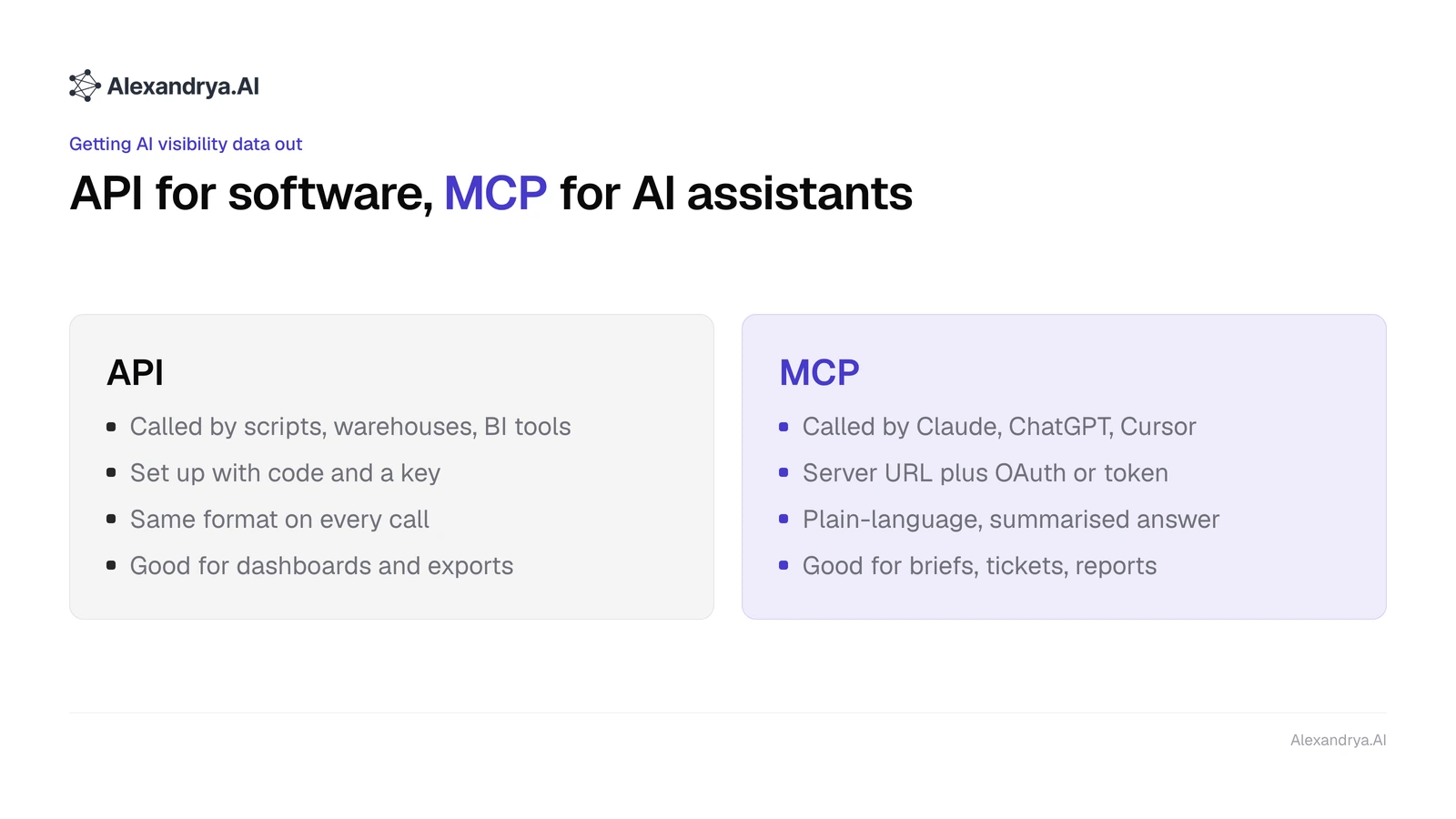
An API sends AI visibility data to software such as a data warehouse or Looker Studio. MCP sends the same data to AI assistants such as Claude, ChatGPT or Cursor for use in the chat. As of 26 October 2026, Peec AI includes MCP from €85 a month, Alexandrya.AI from €199 and Profound only on Enterprise. The bigger difference is whether the assistant can only read or also change things.
What is the difference between MCP and an API for AI visibility data?
The API of an AI visibility tool is a programming interface with fixed endpoints. Developers and BI tools call it with a key, and every response comes back in the same structure. MCP, the Model Context Protocol, is an open standard that lets an AI assistant discover a tool's functions and call them when your question needs them. An API needs code. MCP needs a server URL and a sign-in.
In practice, an API pays off when the same report has to run identically every week, by machine and without interpretation. MCP pays off when people ask questions of their data that nobody built a report for. The Model Context Protocol is openly documented, and every vendor in this article hosts its MCP server, so there is nothing to install on your side.
| Attribute | API | MCP |
|---|---|---|
| Who sends the request | Script, data warehouse, BI tool | AI assistant such as Claude, ChatGPT or Cursor |
| Setup | Code or connector, key in the header | Add the server URL, sign in with OAuth or a token |
| Output | Same format on every call | Plain-language answer, summarised by the assistant |
| Good for | Dashboards, exports, automation | One-off questions, briefs, tickets, report drafts |
| Typical limit | Quotas in requests or credits | Limits per tool call, rights of the account |
The table explains why many teams end up using both. The API feeds the dashboard that looks the same every Monday, and MCP answers the question that comes up in Tuesday's meeting.
Which AI visibility tools offer API and MCP, and on which plan?
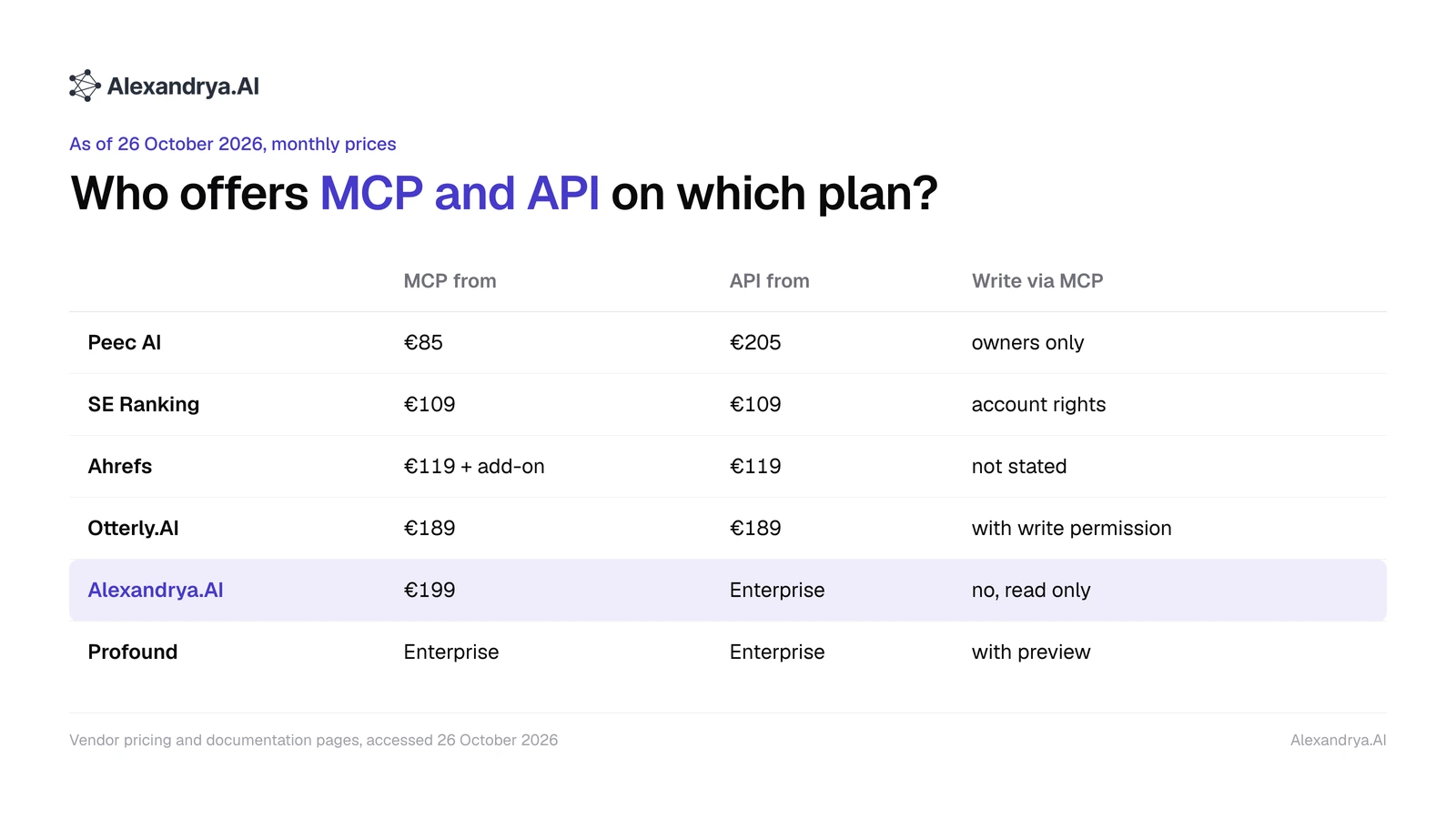
These six AI visibility vendors offered an MCP server as of 26 October 2026: Peec AI, SE Ranking, Ahrefs, Otterly.AI, Alexandrya.AI and Profound. The cheapest entry point is Peec AI at €85 a month, while Profound keeps both API and MCP for Enterprise customers. This overview is a review based on publicly documented pricing and features, not a hands-on test. We used Peec AI for six months ourselves; we have not used the others.
| Vendor | MCP from | API from | What the assistant may do via MCP | Sign-in and limits |
|---|---|---|---|---|
| Peec AI | Starter, €85 | Pro, €205 | Read; project settings only for organisation owners | OAuth or personal access token |
| SE Ranking | Core, €109 | Core, €109 | Full rights of the account | OAuth or API key, 25,000 API credits |
| Ahrefs | Lite, €119; AI data with Brand Radar from €179 | Lite, €119 | Not described in the help article | Separate MCP key, every call uses API units |
| Otterly.AI | Standard, €189 | Standard, €189 | Read; 15 write tools only with write permission | OAuth only, 2,000 MCP requests a month |
| Alexandrya.AI | Professional, €199 | Enterprise, custom | Read only | Personal token, no prompt usage |
| Profound | Enterprise, custom | Enterprise, custom | Read and write, preview before each change | OAuth or API key |
Monthly prices with monthly billing, taken from each vendor's pricing page on 26 October 2026 and sorted by entry price. The spread is wide: the same kind of access costs anything from €85 to an Enterprise contract, and the rights range from read only to deleting prompts along with their history.
Peec AI
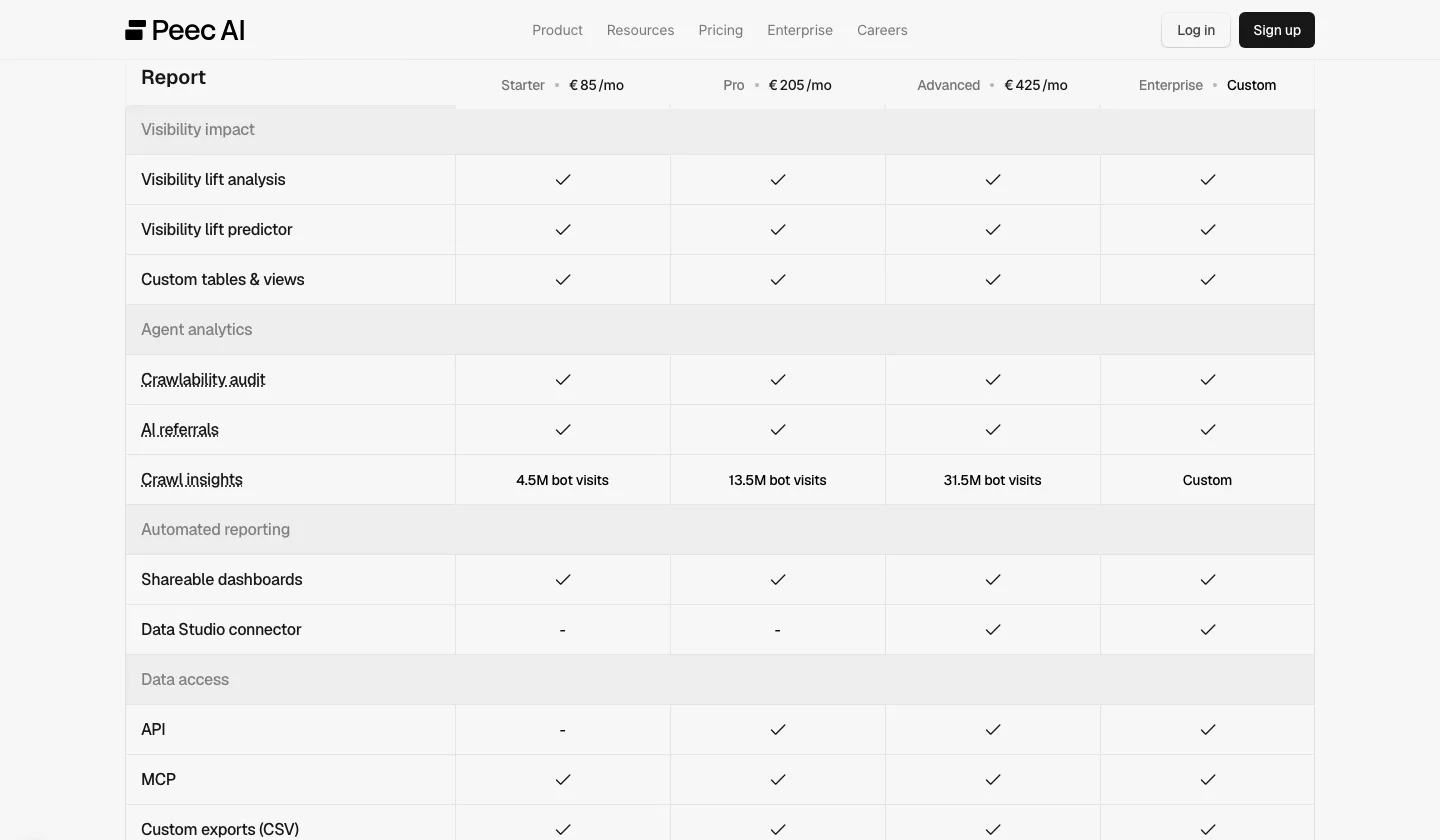
Peec AI includes MCP on every plan from Starter at €85, according to the feature table on its pricing page, and the API from Pro at €205. The plan card also lists API access under Enterprise, so confirm with sales before you buy. Its MCP documentation says most tools are read-only. A smaller set creates, edits or deletes prompts, topics, tags, brands and domain classifications, in batches of up to 50, and only for organisation owners.
Peec AI fits if you want MCP at the lowest price and want your assistant to maintain the prompt list as well. Looker Studio arrives only on Advanced at €425.
SE Ranking
SE Ranking includes MCP access and 25,000 API credits on its Core plan at €109 a month with monthly billing, along with 100 prompts tracked daily. The same server returns classic SEO data and the AI visibility data from SE Visible. The MCP page is explicit that a key has the same access as your account and that restricted or read-only keys are not available yet. Sub-accounts cannot connect on their own for now.
SE Ranking fits if your assistant should combine keyword, backlink and AI data in one conversation. Where SEO suites stop and dedicated AI monitoring starts is covered in AI monitoring vs SEO tools.
Ahrefs
Ahrefs includes API and MCP access from its Lite plan at €119 a month. For AI visibility you add the Brand Radar add-on from €179 a month. According to the Ahrefs help centre, every MCP call consumes API units, at least 50 per call, and MCP keys are not interchangeable with API keys. The article does not say whether the server can write. For AI visibility over MCP, budget at least €298 a month: €119 for Lite plus €179 for Brand Radar.
Otterly.AI
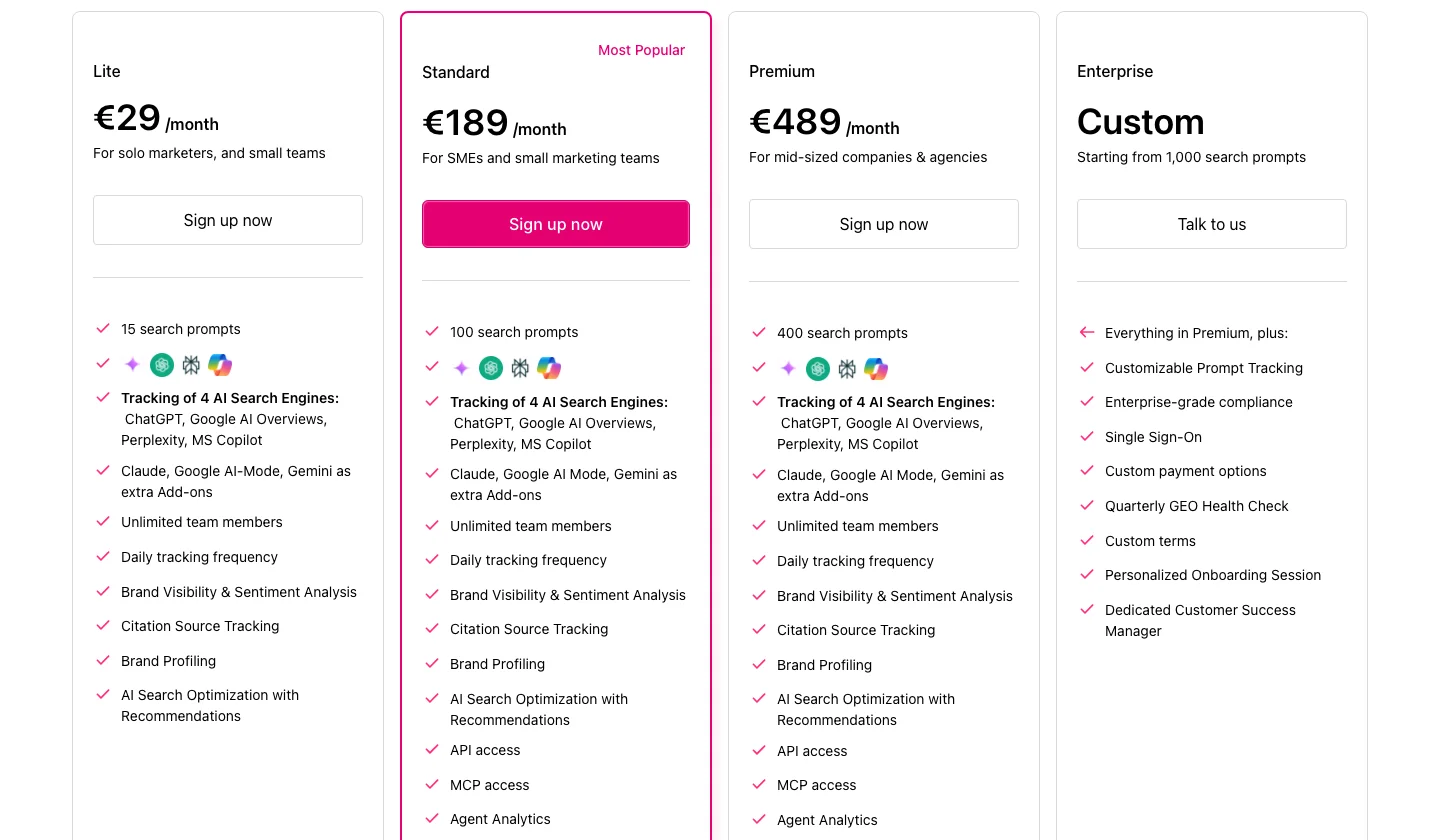
Otterly.AI adds API and MCP access on its Standard plan at €189 a month with 100 prompts. Premium costs €489 with 400 prompts. The quotas set them apart: Standard includes 2,000 API requests and 2,000 MCP requests a month, Premium 5,000 of each. The MCP documentation lists 27 read tools and 15 write tools, and the write tools only appear when the account has write permission. Sign-in is OAuth only, and the MCP server rejects API keys.
Otterly.AI fits if your assistant should trigger content checks, crawlability checks or query fan-out analyses, because those are exactly what its write tools do.
Alexandrya.AI
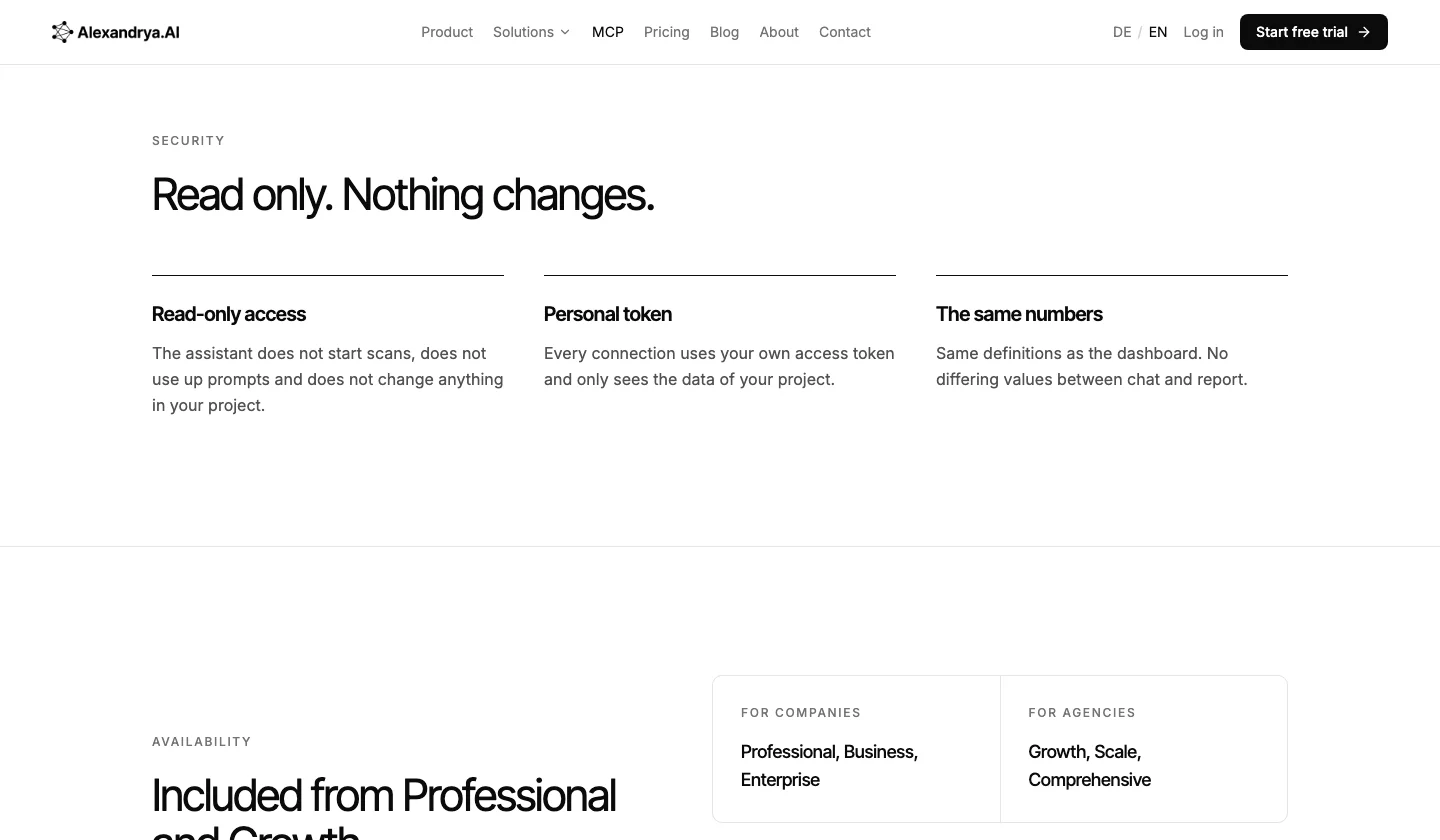
Alexandrya.AI includes its MCP server from the Professional plan at €199 a month, and from Growth at €399 on the agency plans. Access is read only: the assistant does not start scans, does not use up prompts and does not change the project. It reads metrics, scan history, prompts, competitors, full AI answers, sources and the action plan. The API is Enterprise only, and Looker Studio comes with Business at €399.
On 26 October 2026 the server exposed five tools: project_overview, list_scans, list_data, read_answer and read_artifact. If you need to pull data into your own system over the API, you need an Enterprise contract, and there are no alerts and no Slack connection. The details are on the Alexandrya.AI MCP page.
Profound
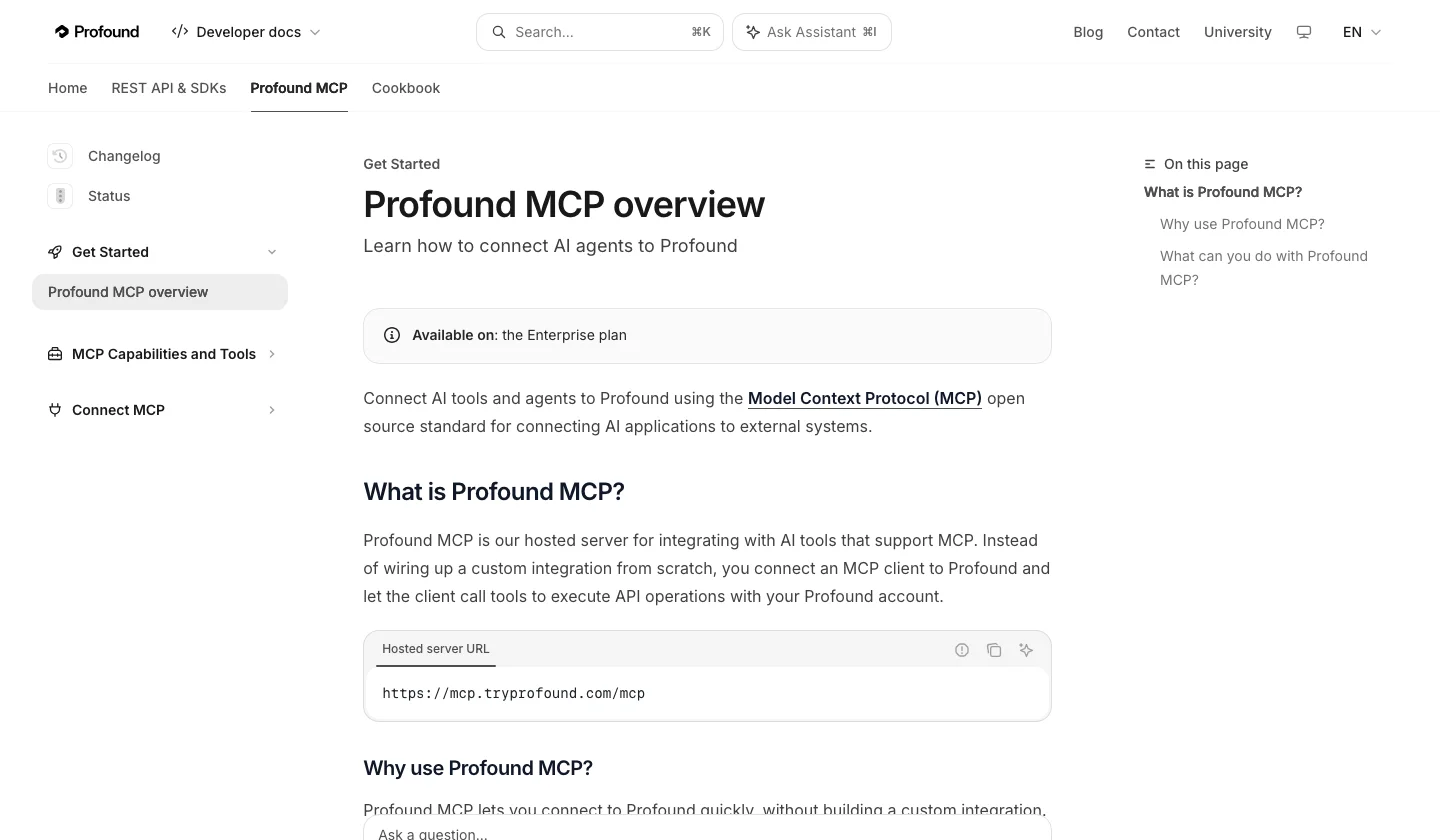
Profound offers API and MCP only on Enterprise, according to its MCP documentation. Its server can change the most: it creates, updates, pauses and deletes prompts, starts workflows and writes documents into knowledge bases. Write tools return a preview first and save nothing until the change is approved. Deleted prompts lose their historical data permanently, the documentation warns.
Can the AI assistant only read, or also change data?
Read-only MCP access lets an AI assistant retrieve stored metrics, answers and sources and nothing more. Write access also lets it create, edit or delete prompts, tags or reports. Reports, briefs and tickets only need read access. Write access is worth it once someone maintains the prompt list regularly and an approval step before every change is in place.
Alexandrya.AI allows no changes at all, because its server is read only. Peec AI limits writing to organisation owners, and the client asks before each call. Otterly.AI hides its write tools from accounts without write permission. Profound shows a preview that only takes effect after approval. SE Ranking gives the key the full rights of the account.
A mistake in the chat has real consequences here. If an assistant deletes a prompt in Profound, its history goes with it, according to the documentation, and your time series has a gap that no export can fill. With a read-only server, the worst outcome is a wrong summary, which you correct in the chat.
Security and data protection before you connect an MCP server
Before you connect an MCP server, settle four things: what rights the connection has, how long a token lasts and who can revoke it, which project data the assistant can see, and where the answers are processed. The last point is easy to miss. Whatever an MCP tool returns ends up in the assistant's conversation, and so with the company behind Claude, ChatGPT or Cursor.
Data from an AI visibility tool is rarely personal, but it is commercially sensitive: your prompt list, your competitors, the prompts you are losing. Check in your assistant account whether conversations may be used for training, and use a team or business account if your IT policy requires one.
| Question | What to look for | Example from the documentation |
|---|---|---|
| How does the assistant sign in? | OAuth can be revoked centrally; a token must be stored safely | Otterly.AI OAuth only, Alexandrya.AI personal token |
| What rights does the connection have? | Read access is enough for reporting | SE Ranking: key with full account rights |
| Which data can it see? | One project or the whole organisation | Alexandrya.AI: only the token's project |
| What does a call cost? | Quotas drain in the background | Ahrefs: at least 50 API units per call |
| Who may change things? | Approval before every change | Profound: preview; Peec AI: owners only |
The table shows that data protection with MCP is mostly a question of rights. Request a data processing agreement from the tool vendor and from the assistant provider separately.
Three workflows that make API and MCP worth paying for
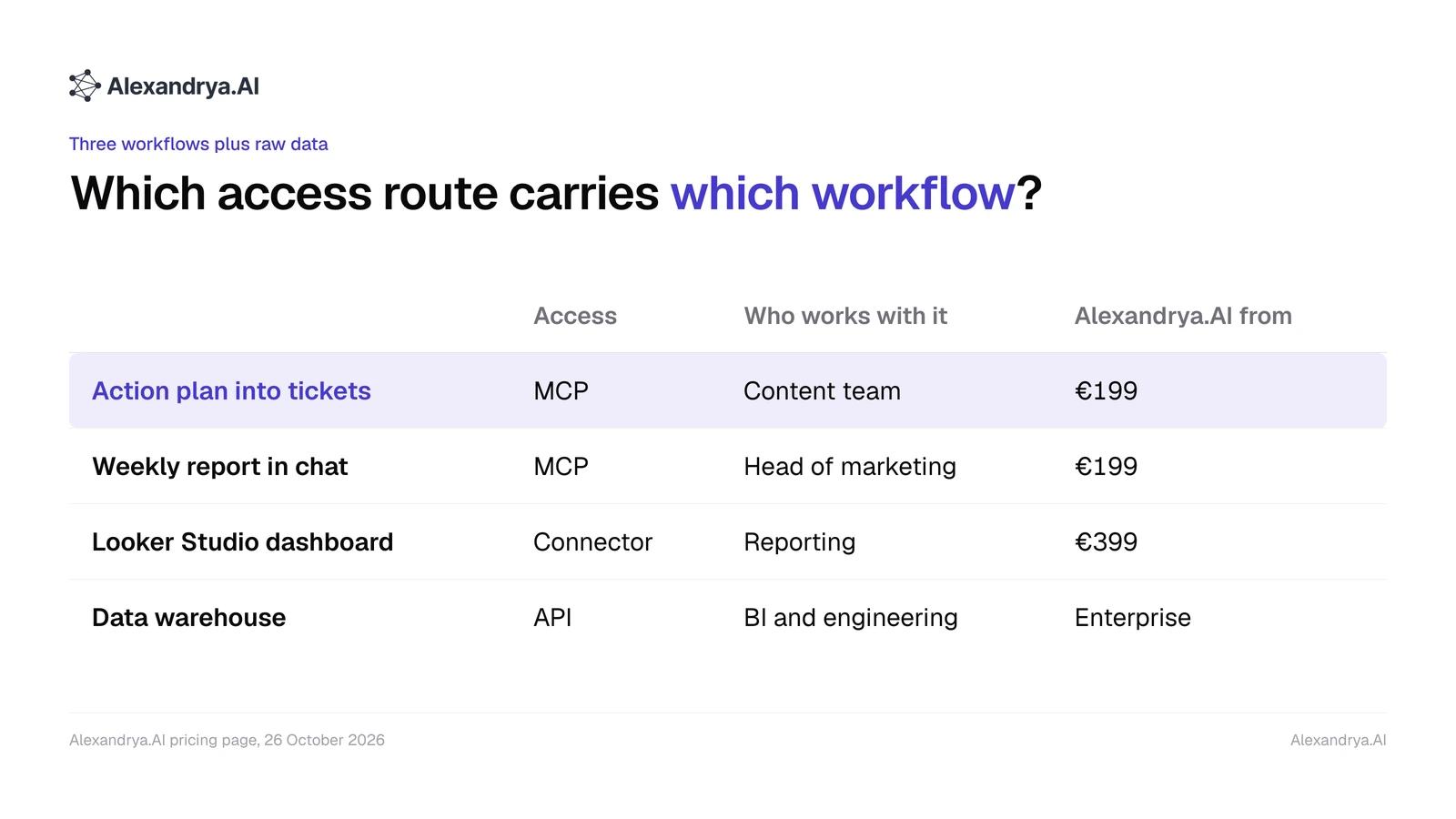
Three workflows account for most of the value: turning action plan recommendations into tickets, having a weekly report written in the chat, and pulling AI visibility into a BI dashboard. The first two run over MCP, the third over Looker Studio or an API. All examples come from Alexandrya.AI's own project with 38 tracked prompts, as of 21 October 2026.
Turning the action plan into tickets
The Alexandrya.AI action plan stores every recommendation with the same fields: action, reasoning, evidence and expected effect. One recommendation from 21 October 2026 suggests a product listing on OMR Reviews, because omr.com was cited 58 times as a source in the project and already has a page of Peec AI alternatives.
The assistant reads that recommendation through read_artifact and creates it in Jira, Linear or Asana through a second connector. The Alexandrya.AI server itself writes nothing; the ticket is created in your project management tool. This is how the fields map:
| Field in the action plan | Field in the ticket |
|---|---|
| Action | Title and task |
| Reasoning and evidence | Description with figure and source |
| Expected effect | Acceptance criterion |
| Affected prompts | Label, later a measurement point |
Alexandrya.AI's own blog queue is built the same way: content briefs from the action plan are read over MCP and filed as article assignments.
A weekly report in the chat
For the weekly report, the assistant calls project_overview and compares two scans from list_scans. One prompt we use, word for word: “Compare the latest scan with the one from seven days ago and write five sentences for the management team, each with a figure and a prompt.” In our own project on 21 October 2026, the brand was mentioned in 7 of 38 prompts, cited in 7 and in first position of the source list in 3.
The figures come from the same summary as the dashboard, so the report never contradicts a screenshot. How a client-facing report should be structured is covered in GEO reports that win clients.
AI visibility data in Looker Studio or your BI stack
For a dashboard that has to look the same every week, MCP is the wrong tool, because a language model rewrites every summary. That job belongs to a connector or the API. Looker Studio comes with Alexandrya.AI Business at €399 and with Peec AI Advanced at €425. Otterly.AI lists its Data Studio connector from Standard.
If you want raw data in your own data warehouse, you need an API. On Enterprise, Profound offers an endpoint with individual answers including mentions, citations and search queries. At Alexandrya.AI this also runs through the Enterprise plan. Which source fields work in a dashboard is explained in AI source analysis by platform.
| Workflow | Access | Who works with it | Minimum Alexandrya.AI plan |
|---|---|---|---|
| Action plan into tickets | MCP plus project management connector | Content team | Professional, €199 |
| Weekly report in the chat | MCP | Head of marketing | Professional, €199 |
| Looker Studio dashboard | Looker Studio connector | Reporting | Business, €399 |
| Data warehouse | API | BI and engineering | Enterprise, custom |
The steps are clear from the table: the two chat workflows cost €199 at Alexandrya.AI, while raw data in your own system needs an Enterprise contract.
Which tool fits which integration need?
The right AI visibility tool with API and MCP access depends on two questions: should the assistant only read or also change things, and do you need raw data in your own system? For reading on the smallest budget, Peec AI leads at €85. For write access with clear quotas, Otterly.AI from €189 has the best documentation. For SEO and AI data in one server, SE Ranking from €109 fits.
- You want MCP as cheaply as possible and want to maintain the prompt list from the chat: Peec AI.
- Your assistant should trigger checks and analyses within fixed request quotas: Otterly.AI.
- You already work in Ahrefs and want backlinks and AI visibility side by side: Ahrefs with Brand Radar.
- You have an Enterprise budget and want to run workflows, prompts and documents from the assistant: Profound.
- Your team should turn recommendations into tickets and reports from the chat, without the assistant being able to change the project: Alexandrya.AI from Professional.
Alexandrya.AI is an AI visibility tool from Munich that measures brand mentions in ChatGPT, Gemini, Perplexity and Bing Copilot and turns them into content and citation tasks. If you need API access without an Enterprise contract, it is the wrong choice. Current plans are on the pricing page.
One question stays open for every vendor: how well assistants cope with large data sets. A project with 350 prompts and five models produces more answers than fit into one chat. Whether the assistant still counts correctly at that size only shows when you check a question you ask every week against the figure in the dashboard.
Frequently asked questions
What is an MCP server in an AI visibility tool?
An MCP server is an interface based on the Model Context Protocol that lets AI assistants such as Claude, ChatGPT or Cursor query the data of an AI visibility tool. The assistant discovers the available tools by itself and uses them when your question needs them. You add a server URL and sign in with OAuth or a token.
Do I need an API or MCP for my AI visibility data?
You need MCP if people want to ask questions of the data in a chat, draft briefs or create tickets. You need an API if data should flow automatically, in the same format every time, into a dashboard or data warehouse. For Looker Studio, many vendors offer a ready-made connector, so no API code is required.
Which Alexandrya.AI plan includes MCP and API access?
Alexandrya.AI includes MCP from the Professional plan at €199 a month, and from Growth at €399 for agencies. API access is only part of the Enterprise plan, which is priced individually. Looker Studio is included from Business at €399. Every plan can be tested free for seven days without a credit card.
Can an AI assistant change data in Alexandrya.AI through MCP?
No. The Alexandrya.AI MCP server is read only. The assistant does not start scans, does not use up prompts and does not change anything in the project. Every connection runs on a personal token and only sees the data of its own project. Tickets or documents are created through your assistant's other connectors.
Which AI visibility tool has the cheapest MCP access?
As of 26 October 2026, Peec AI has the cheapest MCP access: its pricing page includes it on every plan from Starter at €85 a month. SE Ranking follows at €109 on Core and Ahrefs at €119 on Lite, plus the Brand Radar add-on for AI data. Profound offers MCP only on Enterprise.
Is connecting an MCP server safe from a data protection point of view?
MCP itself is only a transport. Whatever an MCP tool returns ends up in your assistant's conversation and so with the company behind Claude, ChatGPT or Cursor. Check whether conversations may be used for training and what rights the connection has, and request a data processing agreement from both providers before connecting.
Free GEO audit
Want to see what your assistant would learn about your AI visibility before you connect anything? The free GEO audit shows which prompts make ChatGPT, Gemini and Perplexity mention you and where competitors are ahead. Check your AI visibility for free
Frequently asked questions
What is an MCP server in an AI visibility tool?
An MCP server is an interface based on the Model Context Protocol that lets AI assistants such as Claude, ChatGPT or Cursor query the data of an AI visibility tool. The assistant discovers the available tools by itself and uses them when your question needs them. You add a server URL and sign in with OAuth or a token.
Do I need an API or MCP for my AI visibility data?
You need MCP if people want to ask questions of the data in a chat, draft briefs or create tickets. You need an API if data should flow automatically, in the same format every time, into a dashboard or data warehouse. For Looker Studio, many vendors offer a ready-made connector, so no API code is required.
Which Alexandrya.AI plan includes MCP and API access?
Alexandrya.AI includes MCP from the Professional plan at €199 a month, and from Growth at €399 for agencies. API access is only part of the Enterprise plan, which is priced individually. Looker Studio is included from Business at €399. Every plan can be tested free for seven days without a credit card.
Can an AI assistant change data in Alexandrya.AI through MCP?
No. The Alexandrya.AI MCP server is read only. The assistant does not start scans, does not use up prompts and does not change anything in the project. Every connection runs on a personal token and only sees the data of its own project. Tickets or documents are created through your assistant's other connectors.
Which AI visibility tool has the cheapest MCP access?
As of 26 October 2026, Peec AI has the cheapest MCP access: its pricing page includes it on every plan from Starter at €85 a month. SE Ranking follows at €109 on Core and Ahrefs at €119 on Lite, plus the Brand Radar add-on for AI data. Profound offers MCP only on Enterprise.
Is connecting an MCP server safe from a data protection point of view?
MCP itself is only a transport. Whatever an MCP tool returns ends up in your assistant's conversation and so with the company behind Claude, ChatGPT or Cursor. Check whether conversations may be used for training and what rights the connection has, and request a data processing agreement from both providers before connecting.
How visible is your brand in AI?
Try Alexandrya.AI free for 7 days and see how ChatGPT, Gemini, Perplexity, AI Overviews and Copilot talk about your brand.
- 7 days free
- No credit card required
- All features included
- Cancel anytime
About the author
Talaal Max Habib
Managing Director at Alexandrya.AI
Talaal Max Habib has advised companies in industry, the Mittelstand and e-commerce on SEO and Generative Engine Optimization since 2015. With his team he built Alexandrya.AI, the Munich-based platform that measures how brands appear in ChatGPT, Perplexity and Gemini.
LinkedIn